

The counts are illustrative. What is not illustrative is the last step: most filter interfaces will happily offer an option that produces nothing.
Filtering is the behaviour of a shopper doing exactly what you want: narrowing toward a purchase. The failure mode is that most filter interfaces offer every option regardless of whether it produces results, so a shopper picks size then colour and the page empties. They did nothing wrong. The interface offered a combination that never existed, and unlike a failed search, this dead end was built by the store rather than typed by the customer.
Filtering is a buying signal
Filters get treated as housekeeping.
A shopper applying a filter has a constraint. They need a size, a colour, a price ceiling, a material. That is not idle browsing; it is somebody with requirements narrowing toward a decision, which puts them close to the searchers in chapter 4.9 on the intent scale.
So when a filter interaction ends in an empty page, the visitor you lost was one of the good ones.
The dead end your interface built
Compare it with a failed search.
A search returns nothing because the shopper typed a word you did not anticipate. That is a vocabulary gap, and it is partly on them and mostly on you.
A filter returns nothing because your interface offered an option that produces no results and let them pick it. There is no vocabulary gap. The store presented navy as a choice, the shopper chose navy, and the store then reported that navy does not exist in the size they had already selected.
A failed search is a word you didn't anticipate. An empty filter page is a combination you offered. The Dropshipping Playbook
And unlike a search, there is usually no recovery path. A zero-result search page can at least suggest alternatives. An empty filtered collection typically says "no products match your selection" and leaves the shopper to reverse their own choices one at a time to work out which one was the problem.
Four rules that prevent almost all of it
Your filter values are dirty
Before any of the above, most dropshipping stores have a data problem that makes the interface look amateur no matter how it behaves.
Supplier feeds arrive with inconsistent attribute values, and each variation becomes its own filter option:
| What the filter shows | What happened | What the shopper concludes |
|---|---|---|
| Blue, blue, Blue , BLUE | Four casings and a trailing space | Nobody maintains this store |
| M, Medium, med | Three suppliers, three conventions | Which one is my size? |
| One value with 1 product | An attribute that is not really a filter | Pointless click |
| A filter with 40 values | An attribute with no useful grouping | Scrolls past it entirely |
| "Default Title" | An untouched Shopify variant default | This is a template store |
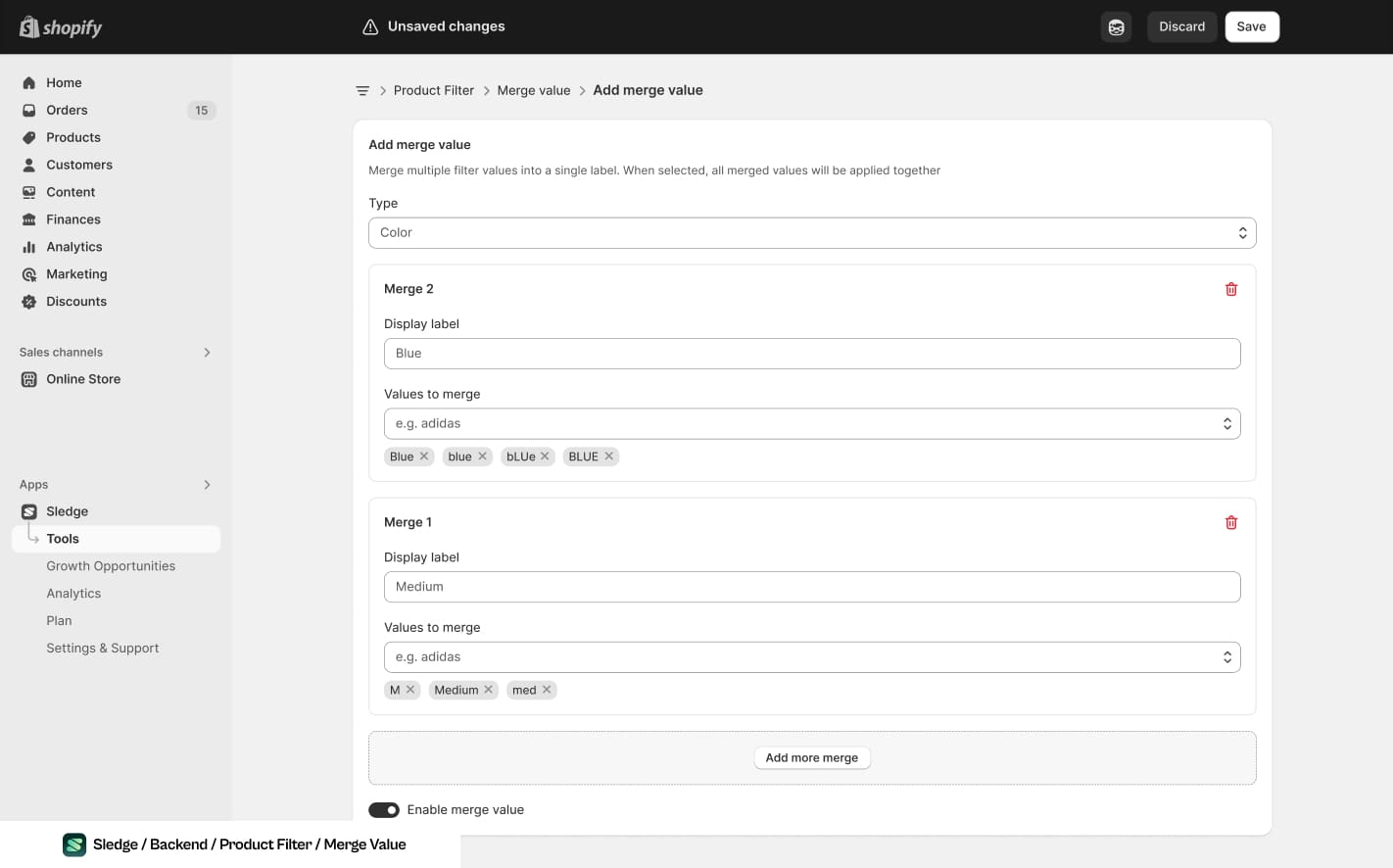
The first two rows of the table above, merged into one label each. The values stay dirty in the feed and stop being dirty on the page.
None of this is design work. It is an afternoon of data cleaning, and it is prerequisite: a beautifully behaved filter over dirty values still looks like a store nobody runs.
Which filters to offer at all
The right set is category-specific, and the test is simple: does this filter answer a question a shopper actually asks about this product?
- Almost always worth it: price, size, colour, and whatever the defining attribute of the category is.
- Worth it when the values are clean: material, brand, compatibility, capacity.
- Rarely worth it: anything with one or two products behind each value, and anything a shopper would have to know your catalogue to use.
- Never worth it: internal attributes that leaked from a supplier feed, and "availability" filters on a dropshipping store where everything is nominally in stock.
Fewer filters also means fewer combinations, and the number of ways to empty a page grows with every filter you add. Each one you decline to offer is a set of dead ends that cannot happen.
Which combinations shoppers actually try, and which ones emptied, is an event stream rather than a report. Chapter 3.4 covers why none of it is retained by default and none of it is recoverable afterwards. Without it, you can fix the combinations you happen to guess and no others.
The order to do it in
- Clean the values. Merge casings, standardise sizes, delete "Default Title". Prerequisite for everything else.
- Cut filters that answer no real question. Fewer filters, fewer dead ends.
- Add counts to every option. The cheapest large improvement on the list.
- Disable zero-result options as the shopper narrows.
- Add a one-click way to remove the last filter, not just clear all.
- Start recording which combinations empty, so next month this is a ranked list rather than a guess.
Common questions
How many filters should a collection have?
Should unavailable options be hidden or greyed out?
Why do my filters have weird values like 'Blue ' and 'blue'?
Do filters matter on a small catalogue?

The app behind these fixes
Most of Level 04 is a setting in Sledge rather than a project.
See it on the Shopify App Store